
Import Demo


Firstly, we want to say thank you very much for purchasing our items on. You really help us to grow and keep up the good work.
Then you may not familiar with Jeg Kit Pro yet, or don’t know where should start using it on your website.
In this section, we want to help you quickly get started building your website with Jeg Kit Pro. Below there are a few essential steps you may need to follow to get your website up and running.
- Prepare Hosting (#)
- Install WordPress (#)
- Install Jeg Kit Pro (#)
- Install Required Plugin (#)
- Import Prebuilt Website (#)
- Ask For Support (#)
1. Prepare Hosting
The first step is you need to prepare and choose where you want to host your website. Choosing the right WordPress hosting for your needs can improve your SEO, speed, and increase revenue. You can read this article for guidance to choose the hosting provider and hosting plan, which meet the WordPress minimum requirements.2. Install WordPress
After your hosting is ready, you need to install WordPress on your server. Some hosting providers may have a WordPress installer feature, but if it’s not, you can install WordPress using cPanel or install WordPress via FTP.3. Install Jeg Kit Pro
Once WordPress is already installed and running well on your hosting, then you are ready to install Jeg Kit Pro. Installing Jeg Kit Pro is quite easy. Basically installing this plugin is almost the same as installing other plugins. You can read this article for guidance on how to install the Jeg Kit Pro plugins.4. Install Required Plugin
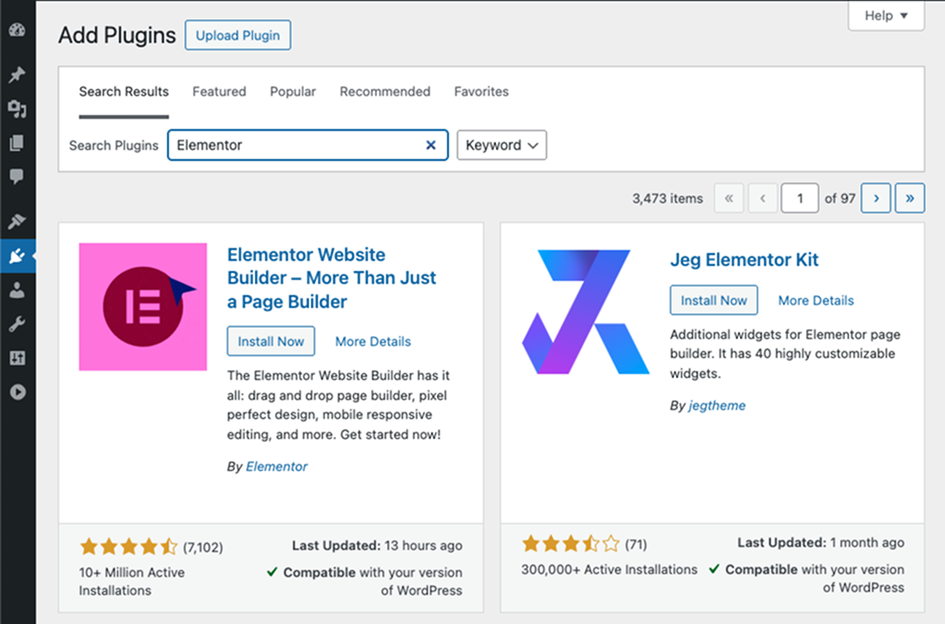
Right after you finish activating Jeg Kit Pro, you will need to install and activate the Jeg Kit and Elementor for this plugins which is a mandatory step to make Jeg Kit Pro fully functional. to Install the required plugin, navigate to Plugins > Add New Plugins > Search For “Elementor” and “Jeg Kit” > Install and activate the plugins